Showing posts with label SQL 2008. Show all posts

Monday, 17 December 2012

More SSIS expressions

One of my first (and most popular!) posts was related to SSIS expressions, so I thought I'd post a few more examples.

First day of this month

As a date:
(DT_DATE)((DT_WSTR, 4)YEAR(GETDATE()) + "-" +RIGHT("0" + (DT_WSTR,2)MONTH(GETDATE()),2)+"-01")

As YYYYMMDD unicode string:

(DT_WSTR, 4)YEAR(GETDATE()) + RIGHT("0" + (DT_WSTR,2)MONTH(GETDATE()),2)+"01"

First day of the previous month

As a date:
(DT_DATE)((DT_WSTR, 4)YEAR(DATEADD("mm", -1, GETDATE())) + "-" +RIGHT("0" + (DT_WSTR,2)MONTH(DATEADD("mm", -1, GETDATE())),2)+"-01")
As a YYYYMMDD unicode string:

(DT_WSTR, 4)YEAR(DATEADD("mm", -1, GETDATE())) + RIGHT("0" + (DT_WSTR,2)MONTH(DATEADD("mm", -1, GETDATE())),2)+"01"

Last day of the previous month

This uses the old programmer trick of subtracting one day from the first day of the current month.

DATEADD("dd", -1, (DT_DATE)((DT_WSTR, 4)YEAR(GETDATE()) + "-" +RIGHT("0" + (DT_WSTR,2)MONTH(GETDATE()),2)+"-01"))

Timestamp in the format YYYYMMDDHHMMSS (ie 20121217160035)

Using the start time of the containing package:
 (DT_WSTR, 4) Year(@[System::StartTime] )
+(Month(@[System::StartTime] )>9?(DT_WSTR, 2) Month(@[System::StartTime] ):"0"+(DT_WSTR, 2) Month(@[System::StartTime] ))
+(DT_WSTR, 2) Day(@[System::StartTime] )+SUBSTRING(REPLACE((DT_WSTR, 20)@[System::StartTime], ":", ""), 12, 8)
Using GETDATE():

Note that the SUBSTRING is slightly different:

(DT_WSTR,4)YEAR(GETDATE()) + RIGHT("0" + (DT_WSTR,2)MONTH(GETDATE()),2) + RIGHT("0" + (DT_WSTR,2)DAY(GETDATE()),2)+SUBSTRING(REPLACE((DT_WSTR, 29)GETDATE(), ":", ""), 12, 6)

Thursday, 28 October 2010

Integration Services Lookup caching - Part one

Lookup caching in Integration Services is a new feature in 2008 which didn't get a lot of attention at the time of release and even now a search reveals some posts that discuss one aspect or other, but maybe not the whole story. Hopefully I will redress the balance here a little.

First of all then - what is Lookup caching?

Back in Integration Services 2005 there was a transformation task which allowed you to match a record in the dataflow with record or field in a database via an OLE DB connection. In a data warehouse context this was often used to look up surrogate keys when loading fact tables. This was OK but every time a lookup was needed it required a round-trip to the database. If you're loading a data warehouse with role-playing dimensions you might be looking up the same values for the same fact table, in the same dataflow. There were some options for preformance-tuining but essentially you always had to connect to the database in some way every time. Inefficient and in stark contrast to products such as Informatica which allowed you to reuse lookup data cached in memory.

So what changed in 2008?

For 2008 Microsoft substantially improved lookup functionality. You now have two basic caching options for lookups. These boil down to in-memory caching and file caching. Both are potentially faster than lookups using a database.

In this post we'll deal with memory-caching.

As the name suggests this stores the lookup data in-memory (ie RAM). This is pretty well covered by Jamie here . The key point is that the in-memory cache will not extend beyond the scope of the package ie you can't re-use an in-memory cache in one package having created in another. At this point its worth clarifying how this is used in a package.

Step one:

After you've created a connection manager, the first step is to create a data source in a Data Flow Task - in this example it is an OLEDB Source Transformation. Note you can use any source for this - providing another advantage over using the 2005 look-up task on its own. I'm calling this OLEDB_Dim_Time for obvious reasons:

  
As you can see we're going to look up a time surrogate key - and by time I mean time of day not a calendar or date dimension. I'll cover the usefulness of a 'real' time dimension in another post. As is best practice we are selecting only the fields needed for the look-up and the value to be added to the data flow (ie the TimeKey).

Step two:

The next step is to terminate the data flow in the Cache Transform - which caches in memory.

The Cache Transform Editor looks as follows:


Here you need to create a cache connection manager by clicking the New... button. This then displays the Cache Connection Manager Editor, give the Cache Connection Manager a sensible name - in this case 'TimeLKP', and click on the 'Columns' tab: 


Here you need to specify which columns are 'indexed columns'. This isn't 'indexed' in the sense that there's a database index on the columns specified, instead this is the index that the lookup will use (ie the business key(s)). In other words, specify the order in which a lookup transform should use the lookup columns - lowest level (ie most granular) first. Here we have one column to lookup on so we make this position 1. Then if you want, you can alter the column names in the cache as follows:


At the end of this you should have a Data Flow that looks something like this:


If you were creating multiple caches you could put them all within the same Data Flow - or split them up, its up to you. However, you have to ensure that the cache is created before the lookup is used. To this end I put the lookup in a seperate Data Flow.

Step three:

All thats left is to use the Cache Connection Manager in a Lookup Transform.
This is very straightforward. Create another Data Flow and within that, a data source connection in the normal way. Then add a Lookup Transform to the Data Flow and open its Editor. Select the 'Cache connection manager' radio button.


Then choose your Cache connection: 


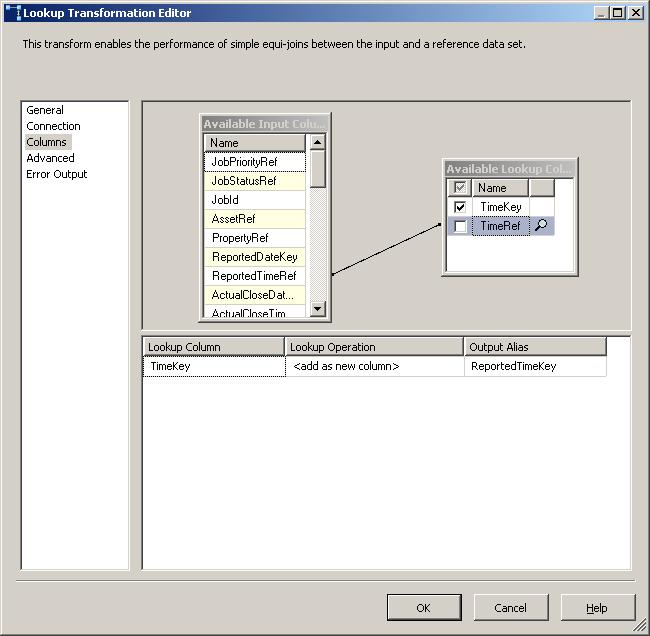
The rest of the process is exactly the same as a normal lookup:


Hopefully thats clarified how to go about creating an in-memory lookup cache. In my next post I'll demonstrate creating a file-cache and share the results of my entirely unscientific performance comparison  of memory-caching vs file-caching vs no caching.

Monday, 11 January 2010

Analysis Services processing failure - 'Class not registered"

Beware of migrating SQL Server 2008 Analysis Services databases from a server that had an upgrade from SQL 2005 to one that has a clean install of 2008 - with no previous 2005 install. What you'll find is that the connection string information in the upgraded database will still be using the 2005 SQL Native Client provider; SQLNCLI.1. This is fine on a box that has this provider of course - ie one with a previous 2005 install. However a clean 2008 install won't have this version and you'll get a not terribly informative 'Class not registered message' when you try and process it - as I found out.

The solution is very straightforward - change the connection string in the database's data source to use SQLNCLI10.1 instead of SQLNCLI.1.

More information can be found here

Thursday, 3 December 2009

Server properties using err.. SERVERPROPERTY

Useful bit of SQL if you're connecting to a SQL Server for the first time:


SELECT SERVERPROPERTY('Edition') AS SQLVersion
,CASE WHEN SERVERPROPERTY('IsIntegratedSecurityOnly')=0
THEN 'Mixed Security' ELSE 'Integrated Security Only' END AS IntegratedFlag
,SERVERPROPERTY('LicenseType') AS LicenseType
,SERVERPROPERTY('ProductLevel') AS SPLevel
,SERVERPROPERTY('ServerName') AS ServerName
,SERVERPROPERTY('Collation') AS Collation

Sunday, 17 May 2009

Kilimanjaro now 2008 R2 and Madison CTP out in July

Kilimanjaro, previously the code name of the next release of SQL Server is now SQL Server 2008 R2.

The list of features is pretty long for an 'R2' - the link above provides the full details, but as a hopelessly biased BI chap, the most interesting one for me is the technology previously known as Gemini. This is MS's answer to the column-orientated 'in-memory' analysis engines of vendors such as QlikTech. The ability to be able to provide users with an ability to analyse millions of rows of data through Excel at 'lightening fast speeds' without needing to create cubes, write MDX etc is an interesting one, to say the least. No confirmed date for this but Mary-Jo Foley reckons it will be July.

For me though the most exciting announcement is that a Madison CTP is also planned for July. The lack of a compelling scalability story has always been a bit of a chink in SQL Server's armour, particularly when compared to vendors such as Teradata and Netezza, and I will be all over this when it comes out.

What both of these announcements show is that SQL Server is forging ahead, addressing weaker product areas and - providing the CTP's ship on time - on schedule.

Thursday, 3 April 2008

PerformancePoint Monitoring Data Source Connection Problems - Solution for XP

Long title for a post! Over the last day or two I've been getting to grips with PerformancePoint 2007 , in particular the Monitoring Server product - including KPI's, scorecards, dashboards and so on. Be warned - there are some prerequisites including ASP.NET AJAX extensions which aren't mentioned on the PerformancePoint website.

Long story short, I came up against the problem detailed in full by Nick Barclay here. If you're running Vista or Windows 2003 you should read that post for the solution. However was I using XP.

Briefly, the problem was that creating a Data Source in the Dashboard Designer results in the following message:

"The PerformancePoint Server could not connect to the specified data source. Verify that either the current user or application pool user has Read permissions to the data source, depending on your security configuration. Also verify that all required connection information is provided and correct"


The reason for the message is that PerformancePoint is written in ASP.NET and as such, under IIS 6 it uses several Application Pools. Its the account that these app pools run under that is used to connect to a Data Source. Unfortunately XP uses IIS 5.1 so there's no app pools and therefore Nick's solution doesn't work. However there is a solution that I stumbled across.

On IIS 5 ASP.NET websites run under the ASPNET account. However, changing the priviliges (ie adding to the Administrators group) is bad practice and more fundamentally won't work. The solution is to give the ASPNET account priviliges on the target Data Source. This is easy enough for SQL Server - simply add the ASPNET account as a user and give it access to the relevant database. The Analysis Services solution is slightly more involved.

Basically you need to add a Role to the Analysis Services cube and add the ASPNET account as a member. Here's some screenshots showing the process in SSMS.

Connect to your cube and navigate to the 'Role' folder and right-click on it. Choose 'New Role...':

On the Create Role dialogue click the 'Full Control (Administrator)' box, and give it an appropriate name (for the purposes of this example we'll leave it as 'Role'):

Click the 'Membership' property in the right-hand pane. Then click the 'Add...' button:

Type ASPNET as the object name and click 'Check Names' - it should underline it:

Click OK, and OK again on the 'Create Role' dialogue. Fire up the Dashboard Designer and you should find the Data Source connects fine.

Friday, 7 March 2008

Details of Windows 2008/SQL 2008 performance emerging

Some pretty stellar performance being recorded for SQL 2008 on Windows 2008 on the SQL Server Performance Blog. Record ETL performance of over 2TB an hour! As they say themselves - not a certified benchmark but impressive nonetheless, and the sort of performance you'd expect of a data appliance and/or Informatica, Ab Initio et al. White paper to follow which should be an interesting read.

Some benchmarks that are certified on the other hand are the Transaction Processing Council (TPC). HP have posted the first 10TB TPC-H benchmark for Windows 2008/SQL Server 2008, achieving over 1000 queries per minute at less than $40 per query. Oracle and DB2 still do better at this scale - both in terms of raw performance and price/performance but SQL is catching up with every release. It'll be interesting to see the 3TB results because there wasn't much in it under SQL 2005.

Does any of this matter? Well yes and no. Clearly you're not going to embark on a 10TB data warehouse with only a handful of TPC benchmarks to guide you, but whereas previously you might not consider SQL Server for this scale I think its becoming more viable. Nationwide's Basel II data warehouse was predicted to get to that size a couple of years a ago and that was running on SQL 2005 and Windows 2003.

Monday, 4 February 2008

More useful blogs

Sometimes it amazes me how much good stuff people in the SQL community are blogging about. I for one have difficulty keeping up with it all. Stumbled across this by Michael Entin none other than the Tech Lead for SSIS - not someone I'd heard of I'm ashamed to say. Anyhoo lots of informative posts particularly about SQL 2008, including one about the improvement in multi-threading execution trees and another about compatability between VS2008/SQL2008 and VS2005/SQL2005 (note - there are limitations).

I found another detailed and interesting post here about Change Data Capture which could be really big news for BI on SQL2008 providing that a) your source system will be migrated onto 2008, and b) you can persuade your source system DBA's to switch it on. One of the major issues frequently encountered working with large source systems is figuring out the delta - ie whats changed since you last did an extract. Change Data Capture (CDC) could be a neat solution. Time to start bending your fellow DBA's ears now..