Thursday, 18 March 2010
SQL Bits VI Registration Open
Title says it all really. Go here to register and here for the agenda - lots of BI stuff needless to say...

Thursday, 18 February 2010
SQL Bits 6 and MS Tech Days announced
SQL Bits VI, The 6th Sets (see what they did there?) was announced a few days ago (although I only got the mail yesterday). Its on the 16th April in London. Handily, the day before - also in London - MS has announced a Tech-day devoted to SQL Server. Good news is that they are both free so get in fast as these are likely to fill up quick...
Update: registration is yet to open for SQLBits, but you can join their mailing list to be told when it does.
Update: registration is yet to open for SQLBits, but you can join their mailing list to be told when it does.
Wednesday, 10 February 2010
Repeating table headers in Reporting Services 2008
You may find it a bit of a challenge to get Reporting Services 2008 to repeat table headers across pages. Unfortunately the tablix properties 'Repeat Row Headers' and 'Repeat Column Headers' appear to do absolutely nothing despite what MSDN says. In fact there is a connect request related to it here. There is a bit of information on the web about this - but not definitive guide and I still found myself scratching my head a bit, so here's my attempt at explaining it:
Step 1:
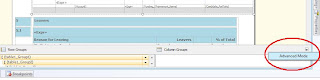
Select the tablix in question and click the arrow on the left of Column Groups and the bottom of the Design tab, and select 'Advanced Mode':
Step 2:
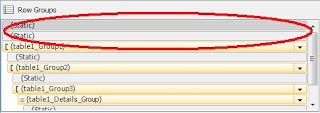
Under 'Row Groups' you should now see grey bars before and after each tablix grouping marked '(Static)'. These represent the column headers for each group. Click on one of these:
Step 3:
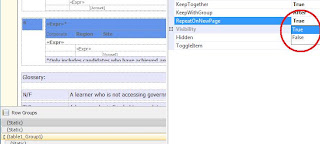
Click the Properties Window (there's no right-click menu on the static groups). On the RepeatOnNewPage property click 'True':
Step 4:
Repeat step 3 for every static group that a repeating header is required. Bear in mind there are the static groups after the tablix - don't set these to repeat.
Then you should be done! Shame this can't simply be done on the tablix property - lets hope MS fix this in a Service Pack at some point.
Step 1:
Select the tablix in question and click the arrow on the left of Column Groups and the bottom of the Design tab, and select 'Advanced Mode':

Step 2:
Under 'Row Groups' you should now see grey bars before and after each tablix grouping marked '(Static)'. These represent the column headers for each group. Click on one of these:

Step 3:
Click the Properties Window (there's no right-click menu on the static groups). On the RepeatOnNewPage property click 'True':

Step 4:
Repeat step 3 for every static group that a repeating header is required. Bear in mind there are the static groups after the tablix - don't set these to repeat.
Then you should be done! Shame this can't simply be done on the tablix property - lets hope MS fix this in a Service Pack at some point.
Wednesday, 20 January 2010
SQL Server 2008 R2 release dated
So the speculation was right. SQL Server 2008 R2 will be out in May this year. Check out the post from MS here. No surprises that PowerPivot and self-service BI is getting a lot of airtime.
Monday, 11 January 2010
Analysis Services processing failure - 'Class not registered"
Beware of migrating SQL Server 2008 Analysis Services databases from a server that had an upgrade from SQL 2005 to one that has a clean install of 2008 - with no previous 2005 install. What you'll find is that the connection string information in the upgraded database will still be using the 2005 SQL Native Client provider; SQLNCLI.1. This is fine on a box that has this provider of course - ie one with a previous 2005 install. However a clean 2008 install won't have this version and you'll get a not terribly informative 'Class not registered message' when you try and process it - as I found out.
The solution is very straightforward - change the connection string in the database's data source to use SQLNCLI10.1 instead of SQLNCLI.1.
More information can be found here
The solution is very straightforward - change the connection string in the database's data source to use SQLNCLI10.1 instead of SQLNCLI.1.
More information can be found here
Visual Studio 2008 crash using Reporting Services 2008 charts
Frustrating day today - with a few techology niggles (see above). Anyway this means I can post about it in the hope that it saves someone else a lot of trouble. The major problem I had was with Visual Studio 2008 crashing without warning or error. The first occasion led to me losing work. On both occasions it happened after adding a standard line chart to a Reporting Services report. After checking the Event Log I found the following entry:
Did some Googling around and discovered many people getting a similar (though not identical) error message. The answer is to download a hotfix here. So far this seems to have done the trick with no crashes. Note that this isn't included in Visual Studio SP1 or SQL Server 2008 SP1- so service packing won't help (it is in fact a .NET hotfix, from what I can tell) . I would strongly suggest applying the hotfix for anyone planning to do graph/chart work in Reporting Services 2008...
.NET Runtime version 2.0.50727.3603 - Fatal Execution Engine Error (7225795E) (80131506)
Did some Googling around and discovered many people getting a similar (though not identical) error message. The answer is to download a hotfix here. So far this seems to have done the trick with no crashes. Note that this isn't included in Visual Studio SP1 or SQL Server 2008 SP1- so service packing won't help (it is in fact a .NET hotfix, from what I can tell) . I would strongly suggest applying the hotfix for anyone planning to do graph/chart work in Reporting Services 2008...
Thursday, 3 December 2009
Server properties using err.. SERVERPROPERTY
Useful bit of SQL if you're connecting to a SQL Server for the first time:
SELECT SERVERPROPERTY('Edition') AS SQLVersion
,CASE WHEN SERVERPROPERTY('IsIntegratedSecurityOnly')=0
THEN 'Mixed Security' ELSE 'Integrated Security Only' END AS IntegratedFlag
,SERVERPROPERTY('LicenseType') AS LicenseType
,SERVERPROPERTY('ProductLevel') AS SPLevel
,SERVERPROPERTY('ServerName') AS ServerName
,SERVERPROPERTY('Collation') AS Collation
Subscribe to:
Posts (Atom)